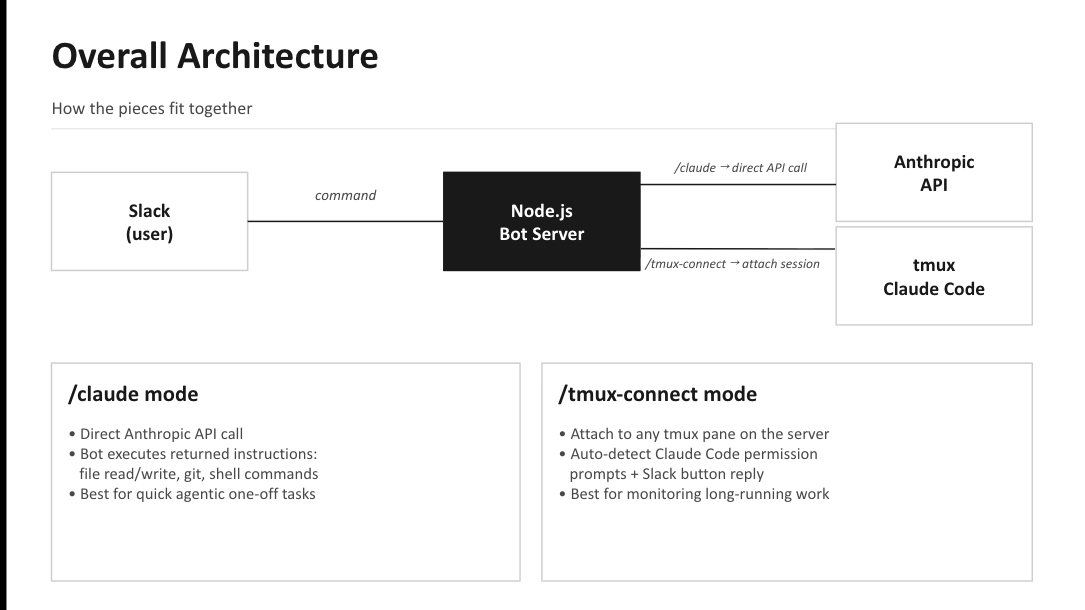
Using a personal Slack workspace and a custom Slack bot to (1) control a Claude Code agent running in a server’s tmux session, and (2) make direct Anthropic API calls to the Claude model — independent of the tmux session — for one-off tasks and questions.
Detailed Explanation
Two Ways the Bot Talks to Claude
This bot uses a personal Slack workspace and a custom Slack app to interact with Claude through two completely separate paths. Understanding the distinction matters — they behave differently and are useful for different things.
(1) Claude Code in a tmux session — via /tmux-connect
- Target: a Claude Code CLI process already running inside a
tmuxsession on the server. - How the bot connects: it uses
tmux send-keysto inject input andtmux capture-paneto read the screen of that process. - State: fully preserved. Whatever project Claude Code has open, whatever task is in flight, whatever permission prompts are pending — all of that context lives inside the tmux session and stays intact across Slack interactions.
- What it’s for: monitoring and remotely controlling long-running experiments or agentic work that you want to keep running on the server.
(2) Direct Anthropic API calls — via /claude and ? <question>
- Target: the Claude model on Anthropic’s API servers — the same model you’d talk to on claude.ai.
- How the bot connects: it calls
anthropic.messages.stream({ model, messages, ... })directly from the Node.js bot. - State: none. Each call is independent and stateless. The API has no idea what’s running in tmux, what files exist on the server, or what the Claude Code agent is doing.
- What it’s for: one-off tasks — reading/writing files, running shell commands,
git push, or general questions — all unrelated to the tmux session.
Why the distinction matters in practice
Inside a /tmux-connect thread, if you type:
? How far along is the experiment?
the bot strips the ?, sends "How far along is the experiment?" to the Claude API, and that’s all the API sees. No terminal output, no logs, no project context. Claude will reasonably answer something like “I don’t have any information about that experiment.”
If instead you type the same thing without the ?:
How far along is the experiment?
the bot forwards those keystrokes straight into the tmux session. The Claude Code agent running there receives the question with all of its running context (scripts, logs, open files) and can give a real, grounded answer.
One-line summary
The bot lets you (1) interact with a tmux-resident Claude Code agent that retains full session state, and (2) make stateless Claude API calls for ad-hoc tasks and questions — independent of the tmux session.